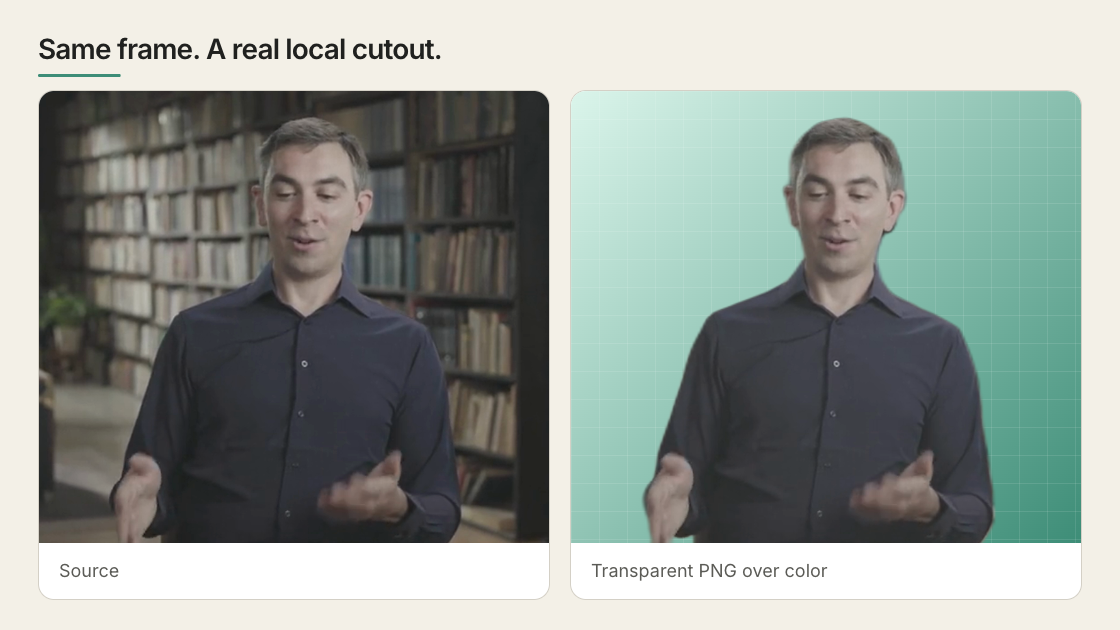
Background removal — also called matting in VFX — separates a foreground subject (typically a person) from its background. The output is a video with an alpha channel: fully transparent where the background was, opaque where the subject is. Drop it into any HyperFrames composition as aDocumentation Index
Fetch the complete documentation index at: https://hyperframes.mintlify.app/llms.txt
Use this file to discover all available pages before exploring further.
<video> tag and the subject floats over whatever you put behind them.
The CLI ships a built-in remove-background command that runs locally — no API keys, no cloud upload, no green screen.
Quick Start
Verify ffmpeg is installed
The pipeline needs Confirm with
ffmpeg and ffprobe for decode + encode. Most systems already have them; if not:Terminal
npx hyperframes doctor — both should be green.Remove the background from your video
Terminal
~/.cache/hyperframes/background-removal/models/. Subsequent runs reuse the cache.Output:How it works
The pipeline runs four stages, all locally:onnxruntime-node with the best-available execution provider on your machine: CoreML on Apple Silicon, CUDA on NVIDIA, CPU otherwise.
The output is encoded with the exact ffmpeg flags Chrome’s <video> element needs to decode alpha — -pix_fmt yuva420p plus the alpha_mode=1 metadata tag. Get those wrong and the alpha plane is silently discarded by browsers.
Output formats
| Extension | Codec | When to use | Size (4s @ 1080p) |
|---|---|---|---|
.webm (default) | VP9 with alpha | Drop into <video> for HTML5-native transparent playback | ~1 MB |
.mov | ProRes 4444 with alpha | Editing round-trip in Premiere / Resolve / Final Cut | ~50 MB |
.png | PNG with alpha | Single-image cutout (only when the input is also a single image) | varies |
Terminal
Layer separation: emit the cutout and the background plate together
Pass--background-output (alias -b) to write a second transparent video alongside the cutout. Same source RGB, alpha is the inverse mask — opaque where the surroundings were, transparent where the subject is. The result is a clean two-layer separation in a single inference pass:
Terminal
| Output | Alpha | Use it as |
|---|---|---|
subject.webm | Mask — subject opaque | Foreground layer (top of stack) |
plate.webm | 255 − mask — subject region transparent | Background layer; place anything you want under the subject’s silhouette between this and subject.webm |
--quality preset, so the layers are pixel-aligned. Encode cost roughly doubles; segmentation cost is unchanged.
Hole-cut vs. clean plate — when does the difference matter?
A hole-cut plate keeps the original surroundings and makes the subject region transparent. A clean plate fills the subject region with reconstructed background — produced by a separate inpainting model. Display each alone over black:| Hole-cut plate (this command) | Clean plate (inpainted) | |
|---|---|---|
| Subject region | Transparent silhouette | Reconstructed background pixels |
| What you see alone | A person-shaped hole | An empty room |
| Cost | One inference pass, one extra ffmpeg encode | A second model (LaMa, ProPainter, E2FGVI) |
| Tool | remove-background --background-output | Outside this CLI |
| Use case | What you need |
|---|---|
| Text/graphics live between the cutout and the plate (the example above) | Hole-cut — the graphics fill the hole. |
| Composite the subject onto an unrelated scene | Neither. Just use subject.webm; the plate is irrelevant. |
| Show “the room without the person” as a real background | Clean plate — a hole-cut plate would show a transparent void. |
| Replace the person with a different subject (re-target) | Clean plate — the new subject needs real pixels under it. |
| VFX rotoscoping / “remove an extra from this take” | Clean plate — the canonical inpainting use case. |
The two-layer composition pattern
The two-layer pattern is functionally a drop-in for text-behind-subject without needing the originalpresenter.mp4 in the project — the plate replaces it as the bottom layer:
.webm or .mov for both outputs. It’s not valid for image inputs (no temporal pairing to do) and won’t accept .png for the plate.
Performance
Real-world numbers from the matting eval, running u²-net_human_seg on a 4-second 1080p clip:| Platform | Provider | ms/frame | 30-second clip |
|---|---|---|---|
| Apple Silicon (M2 Pro / M3 / M4) | CoreML | ~263 | ~2 min |
| NVIDIA GPU (T4, A10, RTX) | CUDA | ~80–150 | ~30–60 s |
| Linux x86 | CPU | ~1100 | ~16 min |
| macOS Intel | CPU | ~900 | ~13 min |
Picking a device explicitly
--device auto is the default and right for almost everyone. The flag exists for two cases:
-
Force CPU on a GPU box when you want to keep the GPU free for other work, or are debugging an EP-specific issue:
Terminal
-
Opt into CUDA by setting
HYPERFRAMES_CUDA=1and providing a GPU-enabledonnxruntime-nodebuild (the bundled build is CPU + CoreML only, to keep the install small for the 99% of users who don’t have a GPU):Terminal
npx hyperframes remove-background --info to see what providers are detected on your machine and which one auto would pick.
Using the transparent video in a composition
The transparent WebM behaves like any other video element. The two patterns you’ll use most: Subject over a background image:loop handles it.
Compositing patterns and pitfalls
The cutout webm is a re-encoded copy of the source mp4’s RGB — the matter pipeline decodes the source to raw RGB, runs segmentation, and re-encodes to VP9 with alpha. That choice has consequences depending on what you put behind it.The three patterns
| Pattern | Behind the cutout | Result |
|---|---|---|
| Cutout over a different scene (most common) | Static image, gradient, animated bg, or unrelated footage | Clean. The cutout is the only source of the subject — no doubling, no edge halo. Use any --quality. |
| Cutout over its own source mp4 (text-behind-subject, talking-head with overlays) | The same mp4 the cutout was generated from | Two RGB sources for the same person. At default --quality balanced (crf 18) the doubling is barely visible; at --quality fast (crf 30) you’ll see a slight color shift / soft edge on the silhouette. Use --quality best (crf 12) for hero shots. |
| Cutout over different footage of the same subject | Another take of the same person | Looks like two overlapping people. Avoid — re-shoot or re-cut the source. |
Text-behind-subject: the recommended layout
Putting a headline behind a presenter so their silhouette occludes the text:Two non-obvious rules
1. Wrap the cutout video in a non-timed<div> and animate the wrapper, not the video.
The framework forces opacity: 1 on any element with data-start/data-duration while it’s “active” — that’s how it controls clip visibility. CSS opacity: 0 on the video element is silently overwritten by the framework’s clip lifecycle, so an opacity tween on the video element won’t do anything. Wrap the video in a <div> that has no data-* attributes; the wrapper is owned entirely by your CSS/GSAP.
2. Both videos start at data-start="0" and decode in sync from t=0.
It’s tempting to “late-mount” the cutout (data-start="3.3" to match the cut). Don’t — Chrome does a seek + decoder warm-up at mount, which can land one frame off the base mp4 at the cut moment. With both videos mounted from t=0 and the cutout’s wrapper opacity-animated, both decoders advance the same way and stay frame-accurate.
Quality preset and color match
When the cutout is overlaid on its own source mp4, the encoder’s CRF directly affects how visible the doubling is at edges:--quality | CRF | File size (12s @ 1080p) | When to use |
|---|---|---|---|
fast | 30 | ~2 MB | Cutout sits over an unrelated background and file size matters |
balanced (default) | 18 | ~6 MB | Recommended for text-behind-subject and any pattern that overlays on the source |
best | 12 | ~12 MB | Hero shots, masters, or anything you’ll re-encode downstream |
What u²-net_human_seg is and isn’t good for
The model is purpose-built for portrait / human matting. It excels when:- ✅ The subject is a person, head-and-shoulders or full-body
- ✅ The framing is reasonably stable (not a wide handheld shot)
- ✅ The background contrasts with the subject
- ❌ Non-human subjects (products, animals, objects). The model will return a mostly-empty mask.
- ❌ Very fine hair detail on a busy background. The 320×320 inference resolution means hair tips get softened — fine for most use cases, but compositors notice.
- ❌ Frame-to-frame temporal consistency. Each frame is processed independently, so static backgrounds with moving subjects can show subtle edge flicker. For most web playback this is invisible; for high-end VFX it may matter.
- ❌ Live streams or real-time capture. The pipeline is batch-only.
Alternatives — when the built-in command isn’t the right tool
The CLI ships one model on purpose — the one that’s MIT-licensed, runs everywhere, and produces production-quality output for person/portrait video. The list below leads with free, open-source tools that pair naturally with HyperFrames. Each entry calls out the actual catch — license, install effort, hardware needs — so you can pick the right one for your situation. Full benchmarks are in the matting eval.Free, open-source CLIs and libraries
These all run locally with no account, no upload, no watermark.| Tool | When to use it | Catch |
|---|---|---|
rembg (Python, MIT) | You need a different subject type — isnet-general-use for objects/animals/products, birefnet-portrait for a quality ceiling on hair, silueta for a tiny ~40 MB footprint. Same family as our default model, more variety. | Requires Python + pip install rembg. Some bundled models (birefnet-*) need ~4 GB RAM and are CPU-only |
| BiRefNet (PyTorch, MIT) | Highest-fidelity portrait mattes available — visibly better hair edges than u²-net | Heavy (~4 GB inference RAM), slow on CPU, broken on Apple CoreML at the time of the eval |
| Robust Video Matting (RVM) (PyTorch, GPL-3.0) | The only widely-available model with temporal consistency built in — no edge flicker on moving subjects. Best choice when you’re matting a long talking-head clip and frame-to-frame stability matters | GPL-3.0 license is incompatible with most commercial / proprietary codebases. Read your repo’s license before using |
| Backgroundremover (Python, MIT) | Simple pip install wrapper around u²-net; nice if you want a Python API instead of our Node CLI | Same model family as ours, no quality difference — pick whichever fits your stack |
| ComfyUI (open-source, GPL-3.0 core) | Custom workflows: chain a segmentation model + alpha refinement + temporal smoothing. The right tool for tricky cases (multiple subjects, hair against a similar background, sports footage) | Setup is involved (Python, models, node graph). Worth it for repeat specialty work |
Terminal
Free desktop / GUI tools
| Tool | When to use it | Catch |
|---|---|---|
| DaVinci Resolve — Magic Mask | You’re already editing in Resolve, want a brush-based UI with manual refinement, and need to round-trip the alpha into a larger edit | macOS / Windows / Linux desktop install. The free tier covers Magic Mask; paid Studio version unlocks higher resolutions on some features |
| Backgroundremover.app (web) | One-off image cutout, no signup, no watermark | Single images only, not video. Free tier is hosted but the underlying tool is the same rembg model family |
| PhotoRoom Background Remover (web) | Quick one-off image, polished UI, no signup | Single images only, e-commerce-tuned model |
Web SaaS tools (free tiers, with strings)
| Tool | When to use it | Catch |
|---|---|---|
| unscreen.com | Quick one-off video, no install, drag-and-drop | Free tier is watermarked and capped at short clips (~10s preview). Paid removes both. Run by the team behind remove.bg |
| RunwayML — Green Screen | Polished UI with brush refinement and time-aware tracking; the closest a SaaS gets to professional roto | Free tier exists but is credit-limited; serious use is a subscription |
| Kapwing — Background Remover | Browser-based, integrates with their video editor | Free tier is watermarked; paid removes it |
How to choose
- Person / portrait video, web playback, MIT-clean → use the built-in
hyperframes remove-background(this is what it’s tuned for). - Non-human subject (product, animal, object) →
rembgwithisnet-general-use. - Maximum portrait quality, especially hair →
BiRefNetvia Python. - Long video where edge flicker would be visible, GPL is OK →
RVM. - One-off marketing clip, no install → DaVinci Resolve (free) for video, Backgroundremover.app for a still image.
- Specialty case the off-the-shelf models can’t handle → ComfyUI with a custom graph.
Troubleshooting
Model download fails or hangs
The weights live on GitHub Releases (rembg’sv0.0.0 release, ~168 MB). If your network blocks GitHub or the download is interrupted:
Terminal
remove-background runs skip the download and use your local copy.
”ffmpeg and ffprobe are required”
The pipeline shells out to ffmpeg for decode + encode. Install viabrew install ffmpeg on macOS or sudo apt install ffmpeg on Debian/Ubuntu. Verify with npx hyperframes doctor.
The output WebM looks fully opaque in the browser
Chrome only reads the alpha plane when the WebM is encoded asyuva420p with the alpha_mode=1 metadata tag. The CLI sets both. If you re-encode the output yourself (e.g. with another ffmpeg invocation), preserve those flags:
Terminal
Terminal
frame0.png should be RGBA and have non-trivial alpha values.
CoreML is “available” but inference fails to start
The pipeline auto-falls-back to CPU if CoreML fails to bind, with a warning. If you want to skip the CoreML attempt entirely, force CPU:Terminal
The alpha mask has rough or jagged edges
That usually means the source frame is high-contrast against a similar-toned background and the model’s 320×320 inference resolution is showing through. Two paths forward:- Re-frame or re-shoot to give the subject a more contrasting background.
- Try
birefnet-portraitviarembg(see Other open-source models) — it’s higher quality at hair edges but slower and heavier.
Reference
- CLI:
hyperframes remove-background - Eval: Matting eval — v7
- Source model: danielgatis/rembg
- ONNX runtime:
onnxruntime-node